Put the right job information where the work happens.
MachineFlow keeps drawings, instructions, setup notes and production context connected to the job, so shop-floor teams can find the current information.

Replace scattered paper with connected job context.
Production information often moves through printed drawings, handwritten notes and separate folders. A connected job card keeps instructions, files and quality context with the work.
- Printed drawings can be out of date or hard to find.
- Setup notes may live on paper or be passed verbally.
- Revision context can become separated from the active job.
- Quality requirements are not always visible where work happens.
- MachineFlow keeps the job record and production context together.
From approved job to production-ready information.
- 01
Job Card Ready
Work linked to its job item.
- 02
Instructions & Files
Drawings and revisioned instructions.
- 03
Acknowledge
Confirm the current instructions.
- 04
Execute Work
Record supported operations.
- 05
QC Checkpoints
Complete required quality checks.
- 06
Progress Visible
Keep work status connected.
Everything operators need, in one focused workspace.
Digital job cards show the work to be done, current drawings, revisioned instructions and relevant notes. Operators can acknowledge the information and record progress as they work.
Keep revisions connected.
When drawings or instructions change, operators need to see the current revision and acknowledge the job card. Keeping that context attached to the job reduces the risk of working from disconnected copies.
- Current revision shown with the job item
- Instruction acknowledgement in context
- Drawing files linked to the revision
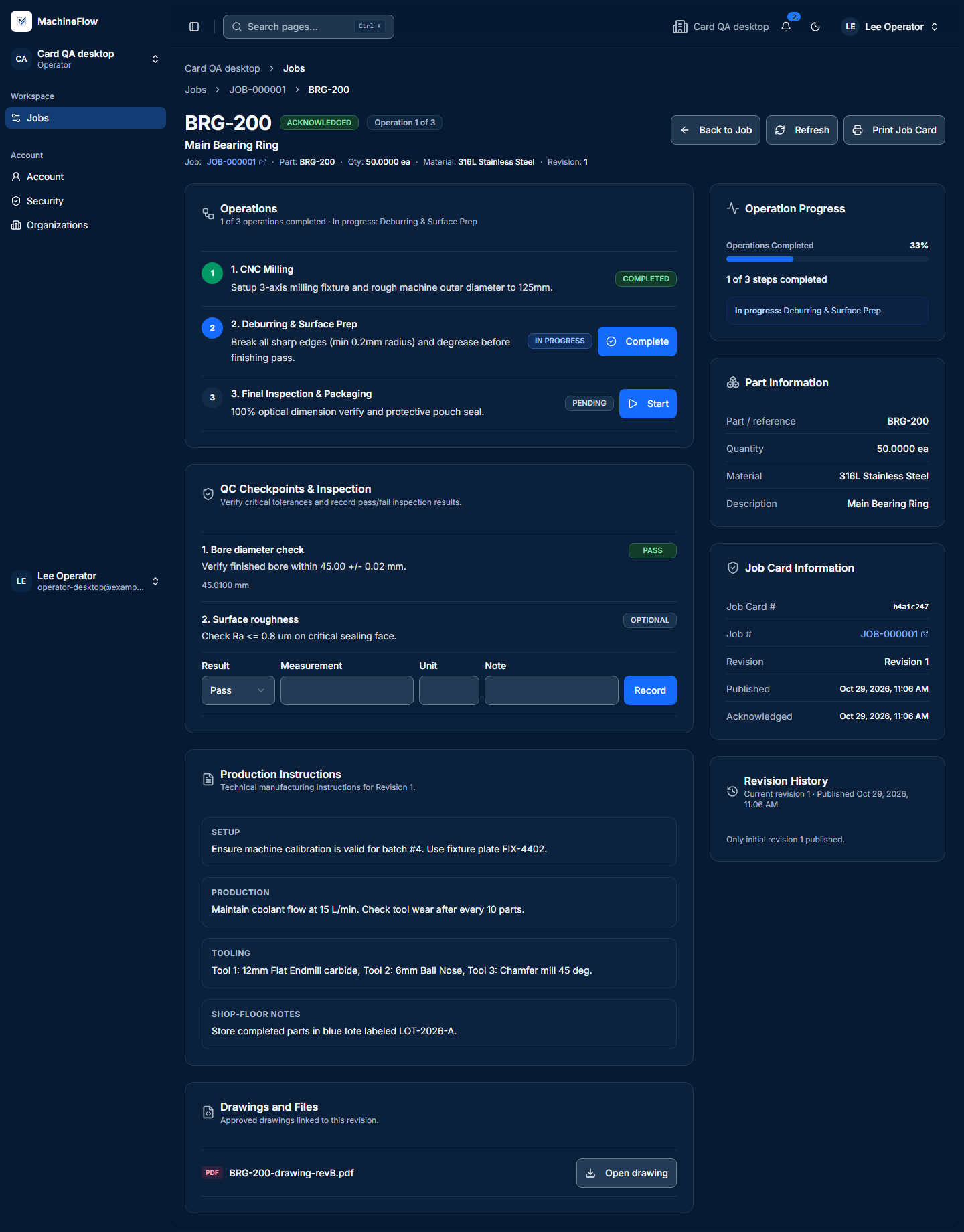
Record progress and complete required quality checks.
Operators can record supported operations and complete required quality checks directly in the job card. Production teams can see what has been done and what still needs attention.
Make job information easier to use on the shop floor.
Talk to us about how your shop currently gets drawings, setup notes and production information to the people doing the work.